


Snapmaker
Snapmaker U1 3D Printer
Snapmaker U1 3D Printer
Regular price
$989.00
Regular price
$1,299.00
Sale price
$989.00
Shipping calculated at checkout.
Quantity
In stock
SKU:
Must-Have Filaments
Kick off your 3D printing journey with official filaments.

Couldn't load pickup availability


Snapmaker U1 3D Printer
Come in-store for exclusive In-Store Pricing
Contact us for Bulk Pricing.

Snapmaker U1 3D Printer
5X More Speed. 5X Less Waste.
Product Overview
• Smooth Printing with 5X More Speed and 5X Less Waste
• SnapSwap™ 4-Toolhead System with 5s Tool Change
• Multi-Color & Multi-Material Printing
• 4 Toolheads Work As One
• Auto Filament Loading
• 500 mm/s Max Speed, Up to 20,000 mm/s² Acceleration
• 270*270*270mm³ Build Volume
• Smooth Printing with 5X More Speed and 5X Less Waste
• SnapSwap™ 4-Toolhead System with 5s Tool Change
• Multi-Color & Multi-Material Printing
• 4 Toolheads Work As One
• Auto Filament Loading
• 500 mm/s Max Speed, Up to 20,000 mm/s² Acceleration
• 270*270*270mm³ Build Volume


Switch Filaments in 5 Seconds with SnapSwap™
Most printers rely on filament changers to switch between colors or materials, spending more time purging than actually printing. With four toolheads preloaded and pre-heated with their own filaments, the SnapSwap™ system lets the U1 switch by simply swapping the toolheads, cutting your wait time from approximately two minutes to only five seconds[2].
No More Purging for Color Change
Filament-changing printers 'purge' by wasting perfectly good filament—pushing one color through the nozzle until the last trace of the old one is gone. The U1 doesn't play that game. It only purges the tiny amount of filament that's actually degraded by the time a new print job begins, or during flow-rate calibration, cutting waste by up to 80%[4] on every print.
Rock-Solid & Precise Locks
The U1 uses steel-ball kinematic couplings to click each print heat into perfect position, then locks it securely—no screws, no magnets, no extra motors. Locked fast, rock solid, tested over 1,000,000 swaps with zero failures.
Less Waste Means Serious Savings
So. Much. Waste. On other 3D printers, printing a multi-color model leaves a mountain of trash – often 3 or 4 times more material is wasted than actually ends up in the model! The U1 avoids waste through smart tool switching, saving filament, saving money, and even helping the environment.
How Much Can You Save in a Year?


“Others” refers to 3D printers that use a filament changer to swap materials.
- Based on PLA filament at an average cost of $15/kg, with a printing frequency of one piece per week.
Pick Your Material Pairs
With four independent extruders, the U1 lets you mix and match materials freely, giving each part its own function, or making support removal a breeze with low-adhesion combos.
PETG Support
With 4 toolheads, U1 prints stable PETG components to support your creation safely, avoiding mid-print warping. These supports are easy to detach without damage, so you can skip tedious prying and keep your finished prints intact
PVA Support
PVA is costly but necessary for some creations. U1's 4-toolhead system minimizes purges to little or zero, so you can pair PVA with other materials freely, reduce waste greatly, and save money dramatically!
Blend Rigid and Flexible Materials
PETG+TPU
With 4 individual extruders, you can match flexible TPU and rigid PETG together, print more creative artwork such as a 3D printed hand bag.
PLA+TPU
U1 supports printing your own customized shoe by feeding TPU materials in different colors and hardness levels, no need for separate prints or gluing. And the PLA support is easy to peel off without ruining your creation
Smooth Print Starts with Smart Calibration
With four toolheads working at high speed, precision isn’t optional—it’s built in. The U1's compensation algorithms lock every toolhead in sync, dampen vibrations, dial in extrusion, and level out the build surface, so you get the smooth, dimensionally accurate results you’d expect from a top-tier single-head printer.
Toolhead Offset Calibration
The U1 automatically aligns XYZ offsets between multiple toolheads, keeping offsets within 0.04mm[5] for sharp prints without vertical shifts.0
Vibration Compensation for Consistent Prints
Input Shaping, aided by a precision accelerometer sensor, reduces vibrations caused by rapid directional changes by pre-processing movement commands to cancel out resonant frequencies. By adjusting acceleration profiles and introducing calculated delays, it prevents surface artifacts like ghosting or ripples, allowing the U1 to deliver clean edges, smooth walls, and sharp details even at high speeds.

Fine-tuned Extrusion for Exquisite Details
The U1 uses Pressure Advance to stay ahead of flow delays, especially during quick moves or sharp corners. It tweaks extrusion timing based on motion changes, so filament flows smoothly even when speeds shift. That means fewer blobs, less thinning, and crisp, consistent detail.
The First Layer Matters Too
The automatic mesh bed leveling delivers a flat, grippy first layer, setting the stage for every print.

Effortless Filament Management
The U1 comes equipped with a super-compact automatic filament system that holds up to four spools on standby. It handles everything from filament detection and loading, so you can print in vivid color, hassle-free.
Manage Your Prints with Ease
Snapmaker Orca builds on Orca Slicer’s powerful engine and adds engineer-tested profiles for official materials and machine models. Paired with the Snapmaker App, you can start, monitor, and control your prints from anywhere—and even capture time-lapses videos to replay your creation in motion. Easy print management is right at your fingertips.

Anomaly Detection and Alert

Capture the Highlights, Skip the Messes
The built-in chamber camera isn’t just for time-lapses. Starting with an OTA firmware update planned for December 2025[6], its AI will detect spaghetti and workspace obstructions and alert you in Snapmaker Orca or the app, helping you avoid wasted time and material.
CoreXY System with 500mm/s Speed
The U1 is built on a CoreXY motion system with lightweight, rigid carbon fiber X-axis rails, delivering speeds of up to 500mm/s and maintaining long-term precision across a 270 × 270 × 270mm work area.

Creative Vibes, Uplifted by U1
Whether you're bonding over colorful creations at home, building your ultimate hobby hub, or adding a clever twist to your everyday style, the U1 makes it all effortless and fun.


Notes:
[1] This data was obtained by printing with PLA filament and a 0.4 mm standard-flow nozzle, using a 0.2 mm layer height, 200 mm/s outer wall speed, and 250 mm/s infill speed.
[2] This is a typical result from Snapmaker Lab tests and is for reference only.
[3] Filament usage may vary with model size, color layout, and print settings. In Snapmaker Lab tests under similar conditions, U1 used roughly 17% to 47% of the filament required by other single-head printers for the same multi-color prints.
[4] This data was measured using clean nozzles. Calibrating with an unclean nozzle could lead to less accurate results.
[5] Detection capabilities will be enabled in December 2025 through an OTA firmware update.
[6] This data was obtained using Snapmaker ABS filament, under a printing temperature of 280°C.
Specifications
General
Dimensions2
584mm × 499mm × 730mm
Weight
18.2kg
Printing Properties
Printing Technology
Fused Deposition Modeling
Build Volume
270mm × 270mm × 270mm
Max Toolhead Speed
500mm/s
Max Acceleration Speed
20,000mm/s²
Toolhead
Toolheads Included
4
Max Flow for Hot End
32mm³/s[6]
Nozzle
Stainless Steel
Max Nozzle Temperature
300°C
Nozzle Diameter
0.4mm
Filament Diameter
1.75mm
Part Cooling
Main & Auxiliary Part Cooling Fans
Heated Bed
Build Plate
Flexible Steel Sheet with PEI Surface
Max Heated Bed Temperature
100°C
Supported Filament Type
Basic Material Compatibility
PLA, PETG, TPU, PVA, PCTG
With Optional Top Cover
PLA, PETG, TPU, PVA, PET, ABS, ASA, PA, PC
With Top Cover & Hardened Steel Nozzle
PLA, PETG, TPU, PVA, PET, ABS, ASA, PA, PC, Carbon-fiber-reinforced Polymer, Glass-fiber-reinforced Polymer
Electronics
Touchscreen
3.5-inch 320 × 480 Touchscreen
Data Transmission Methods
Wi-Fi (IEEE802.11b/g/n Standards, 2.4GHz), USB Flash Drive
Storage
26 GB eMMC
Live View Camera
2 Megapixel Built-in Chamber Camera
Max Input Power
1150 W (220-240 V~), 400 W (100-120V~)
Max Input Current
6 A(220-240V~), 4 A(100-120 V~)
Auto-calibration
Heated Bed Leveling
Mesh Bed Leveling
Active Vibration Control
Accelerometer & Input Shaping Calibration
Automatic Flow Compensation
Pressure Advance Calibration
Automatic Toolhead Offset Calibration
Coordinate Measuring Calibration
Automatic Filament System
Auto-feed
Supported
Backup Mode
Supported
Filament RFID Recognition
Supported
Failure Detection
Air Printing Detection
Supported
Filament Run Out Detection
Supported
Power Loss Recovery
Supported
Anomaly Detection
Toolhead Swap Error Detection
Supported
Build Plate Presence Detection
Supported
Build Plate Obstruction Detection
Supported
Software
Supported Slicer
Snapmaker Orca, Orcaslicer
APP
Snapmaker APP
Operating System
Software
Windows, macOS, Linux
APP
Android, iOS
Firmware
Firmware
Klipper
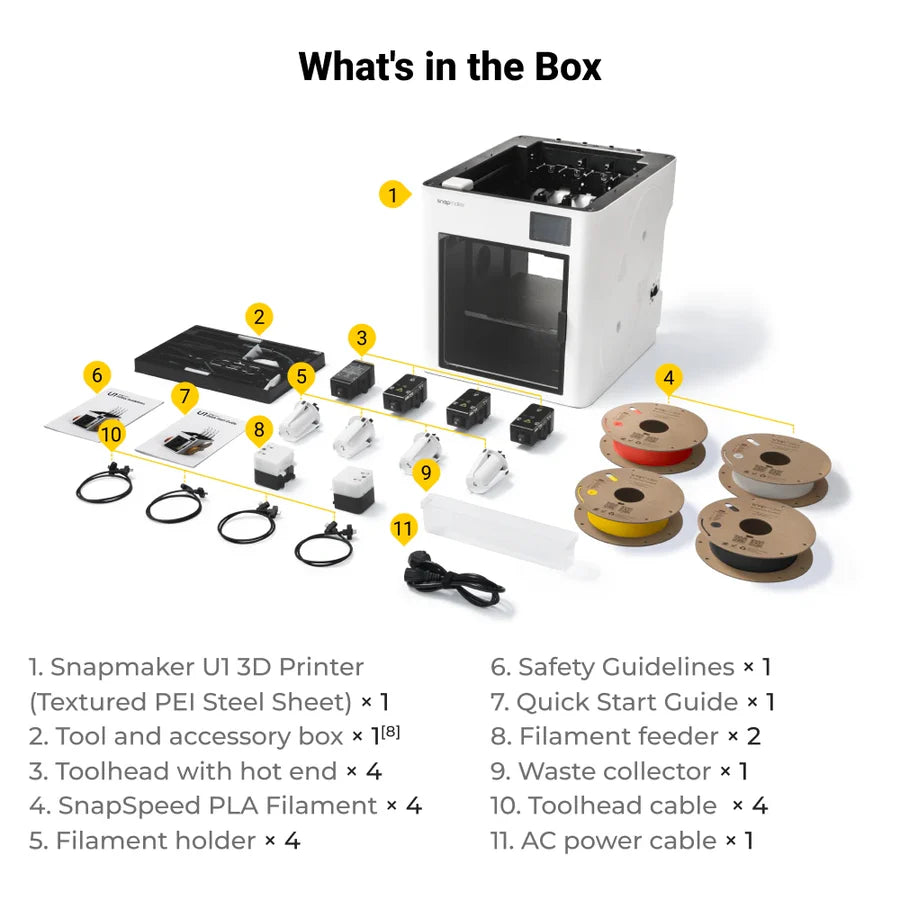
In the Box
-
1. Snapmaker U1 3D Printer (Textured PEI Steel Sheet) × 1
2. Tool and accessory box × 1[8]
3. Toolhead with hot end × 4
4. SnapSpeed PLA Filament × 4
5. Filament holder × 4
- 6. Safety Guidelines × 1
7. Quick Start Guide × 1
8. Filament feeder × 2
9. Waste collector × 1
10. Toolhead cable × 4
11. AC power cable × 1
Notes:
[1] This data was obtained by printing with PLA filament and a 0.4 mm standard-flow nozzle, using a 0.2 mm layer height, 200 mm/s outer wall speed, and 250 mm/s infill speed.
[2] This is a typical result from Snapmaker Lab tests and is for reference only.
[3] Filament usage may vary with model size, color layout, and print settings. In Snapmaker Lab tests under similar conditions, U1 used roughly 17% to 47% of the filament required by other single-head printers for the same multi-color prints.
[4] This data was measured using clean nozzles. Calibrating with an unclean nozzle could lead to less accurate results.
[5] Detection capabilities will be enabled in December 2025 through an OTA firmware update.
[6] This data was obtained using Snapmaker ABS filament, under a printing temperature of 280°C.
Frequently Asked Questions
1. What is the standard nozzle size of the Snapmaker U1?
Snapmaker U1 comes equipped with 4 x 0.4 mm proprietary stainless hotends, along with one spare hotend.
The Heat Sink, Heat Break, Heater Block, and Nozzle are integrated into a single unit and assembled using an interference fit technique, which minimizes filament oozing and heat resistance. They cannot be replaced individually.
2. What connection methods does the Snapmaker U1 support?
The Snapmaker U1 supports two connection methods: Wi-Fi and a USB flash drive. You can either connect wirelessly via Wi-Fi to send print jobs or use a USB drive to transfer and start prints directly from the machine.
3. What is the thickness of the heated bed?
The heated bed has an overall thickness of 6.5 mm, consisting of a 1.5 mm base plus 5 mm reinforcing ribs. With this structure, the bed mesh variation is generally controlled within 0.4 mm, ensuring stability and reliable print quality.
4. Does the Snapmaker U1 support third-party filaments?
Yes, the Snapmaker U1 is compatible with third-party filaments, provided they have a diameter of 1.75 mm and meet general material quality standards. However, please note that the RFID recognition feature will not work with third-party filaments.
5.Does the U1 support printing with TPU filaments?
The TPU materials tested so far have a hardness of ≥90A, while those with a hardness of <90A are currently being evaluated. To ensure optimal print quality, we recommend drying the filament before printing.
6.What is the maximum spool size the holder can accommodate?
The spool holder supports spools with an inner diameter of 52–60 mm, a maximum width of 70 mm, and a weight of up to 1 kg. Please ensure your filament spool falls within these limits to avoid feeding issues.
7. What are the Dimensions and Weight of the Snapmaker U1 Shipping Box?
Dimensions: 580mm x 540mm x 500mm
Weight: 26kg (incl. 500g*4 spools of filament)
8. What slicing software is supported by Snapmaker U1?
We recommend using Snapmaker Orca with the Snapmaker U1 for the best printing experience. We have optimized and adapted several material profiles and settings directly within Snapmaker Orca to ensure smooth and high-quality prints. However, you can also choose OrcaSlicer to import and generate G-code files based on your personal preference.
9. What firmware does the Snapmaker U1 use, and is it open source?
Snapmaker U1 runs on Klipper firmware, with Moonraker for API management. Both have been modified by Snapmaker and are scheduled to be released as open source before March 2026. We also use Fluidd as the web client, which we have not modified and can be open-sourced at any time.
We are currently in a phase of rapid iteration, and additional work is needed to prepare an open-source environment that allows users to modify the code and run it properly on the U1. Once this preparation is complete, we will release the code as promised.
We are currently in a phase of rapid iteration, and additional work is needed to prepare an open-source environment that allows users to modify the code and run it properly on the U1. Once this preparation is complete, we will release the code as promised.
10. U1 Warranty Policy
• 2-year warranty for users from the EU, Switzerland, Norway, and Iceland.
• 1-year warranty for the rest of the world (any country not mentioned above).
For more details, please refer to: U1 Warranty Policy
• 1-year warranty for the rest of the world (any country not mentioned above).
For more details, please refer to: U1 Warranty Policy